 Skip to content
Tools / Software reviews
SOCIAL MEDIA MANAGEMENT
SocialBee Review: Pricing, Features, Pros and Limitations
A practical assessment for businesses and agencies that want a reliable publishing process, useful AI assistance and fewer daily posting chores.
Affiliate disclosure: Social Scale Kenya may earn a commission if you subscribe through the SocialBee links marked as affiliate links in this review.
Our verdict: useful when publishing is the bottleneck
SocialBee deserves a place on your shortlist if you regularly publish across several social networks and want content categories, reusable posts and a structured calendar. It is less compelling if your main problem is an unclear offer, weak creative material or slow sales follow-up. Those problems need decisions and execution beyond a scheduler.
Best fit: a business with a repeatable content plan, or an agency managing several brands. Think twice: if you mainly need native trending-audio tools, a full sales CRM or advanced customer-service routing.
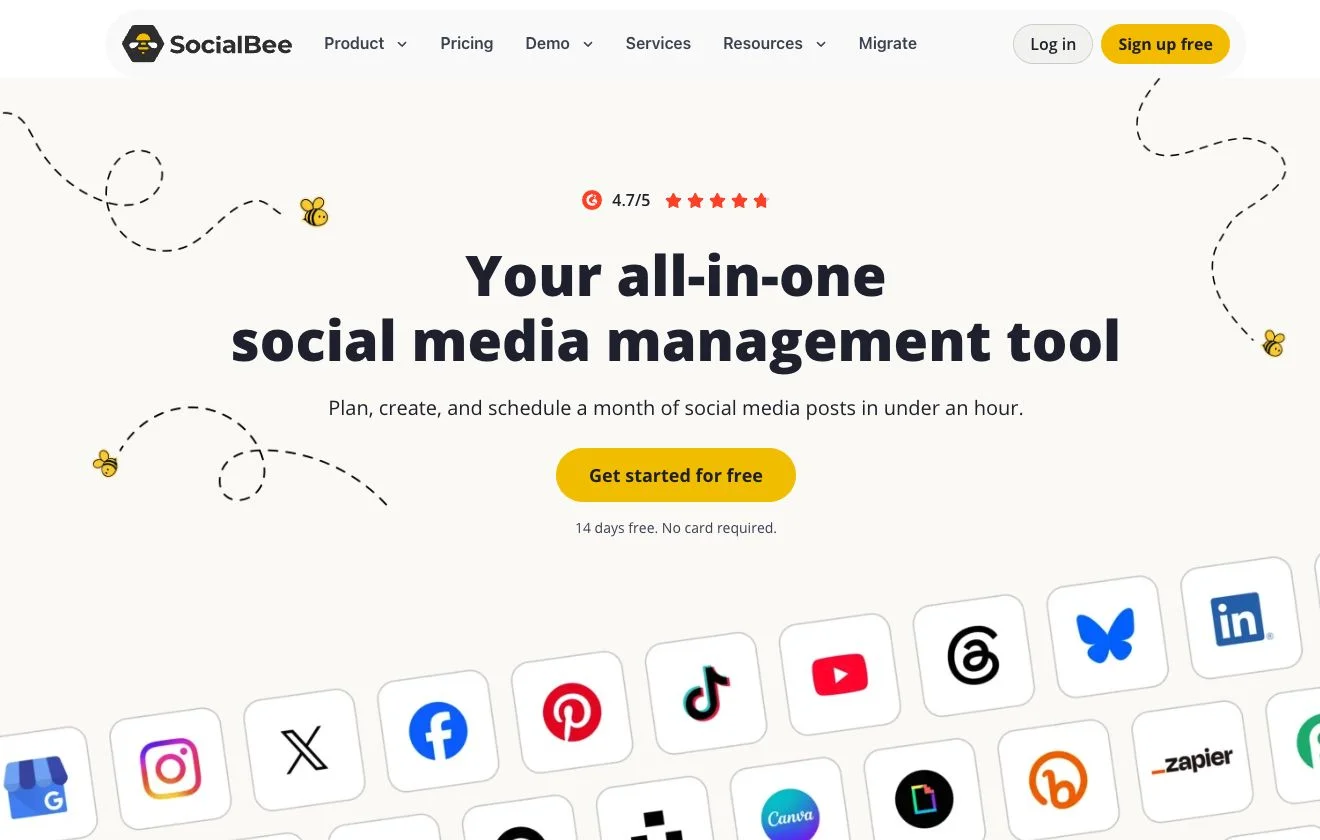
How this review was prepared: We examined SocialBee’s public website, pricing and help documentation. This is a research-based editorial review, not a claim that Social Scale Kenya has run a timed trial or achieved client results using the platform. Product screenshots are attributed vendor examples; the cover is a capture of its public homepage. Affiliate links are identified clearly; documentation links and image source credits point to the original sources.
Inside this SocialBee review
- What SocialBee does and who it suits
- Pricing, plans and the real cost
- Content categories and evergreen publishing
- AI Copilot and content creation
- Supported networks and publishing limits
- Agency workspaces and approvals
- Analytics, inbox and reporting limitations
- A practical Kenyan real estate workflow
- Pros, cons and alternatives
- A 14-day trial checklist
- Frequently asked questions
What is SocialBee, and which businesses should use it?
SocialBee is a social media management platform that brings content creation, scheduling, engagement and performance reporting into one working environment. Its most distinctive idea is category-based publishing: instead of manually assigning every individual post to a blank calendar, you can build themed content collections and give those themes a recurring place in your schedule.
That is useful when social media work repeats. A property agency may need a steady mix of buyer education, neighbourhood comparisons, property tours and viewing invitations. A consultancy may rotate practical advice, case studies, service explanations and founder commentary. The calendar becomes easier to maintain when each type of post has a purpose.
Our assessment is that the strongest buying reason is operational consistency. If you already know what your audience needs but struggle to get approved material published, SocialBee addresses a visible task. If you do not yet know whom you serve or why someone should choose you, a fuller queue can simply distribute the same uncertainty more often.
Who should put it on the shortlist?
- Owner-managed businesses: you batch content once or twice a week and want publishing to continue while you deliver your services.
- Independent social media managers: several accounts need different captions, schedules and approval decisions.
- Agencies: separate brands require organised workspaces and a clear responsibility for what goes live.
- Businesses with reusable expertise: educational content can stay relevant long after the first publication.
For the wider buying decision, start with our guide to choosing marketing tools worth paying for. Give the subscription one measurable job before comparing its feature list.
SocialBee pricing: plans, limits and what you will pay
Standard prices below were checked against SocialBee’s pricing page and its plan guide on 23 October 2026. All amounts are in US dollars. Annual charges are paid for the year upfront; they are not monthly instalments. Confirm taxes and the final checkout total before paying.
| Plan | Monthly billing | Annual billing | Profiles | Workspaces | Users per workspace |
|---|---|---|---|---|---|
| Bootstrap | $29/month | $290/year | 5 | 1 | 1 |
| Accelerate | $49/month | $490/year | 10 | 1 | 1 |
| Pro | $99/month | $990/year | 25 | 5 | 3 |
| Pro50 | $179/month | $1,790/year | 50 | 10 | 5 |
| Pro100 | $329/month | $3,290/year | 100 | 20 | 5 |
| Pro150 | $449/month | $4,490/year | 150 | 30 | 5 |
A profile is a connected social account, not an entire client. One business using Instagram, a Facebook Page, LinkedIn, TikTok and Google Business Profile can therefore consume five profile slots. Count each planned connection before selecting a package.
Which standard plan makes the most sense?
Bootstrap is the starting point for one operator with a small account list. Accelerate expands profile and content capacity, but still includes one workspace and one user per workspace. Do not assume its higher price makes it a shared team account. Pro is the more relevant standard package when several people or separate client workspaces are central to the job.
SocialBee’s comparison lists 10, 50 and unlimited content categories for Bootstrap, Accelerate and Pro respectively. CSV imports, bulk editing and post approval are listed from Accelerate upwards. Branded analytics export is listed on Pro. These distinctions matter more than buying the plan with the most generous marketing label.
Monthly versus annual: compare the commitment
The annual prices for the three standard plans equal about $24.17, $40.83 and $82.50 per month when divided by 12. Paying monthly for a year would cost $348, $588 and $1,188 respectively. The annual savings are therefore $58, $98 and $198, before any taxes or currency costs.
For a Kenyan business, budget using the exchange rate your payment provider actually applies, then account for any conversion or card fees. We have deliberately not presented a fixed Kenya shilling price as though it were a local tariff. A useful comparison is total annual cost, including add-ons, divided by the number of businesses that genuinely use the system.
Important pricing check: SocialBee’s public pricing page still contained June 10 birthday-promotion wording when researched. We have excluded that expired offer from the table. Use the standard rates as a comparison and rely on the checkout for the price you are actually offered.
The advertised trial lasts 14 days, provides Pro access and does not require a credit card. That makes it possible to test a real workflow before choosing an annual commitment. Recheck the lower plan’s limits before subscribing, because a successful Pro trial does not prove Bootstrap includes everything you used.
Content categories turn a calendar into a working system
SocialBee lets you organise posts into categories and allocate those categories to a publishing schedule. Its category documentation explains the setup, while its evergreen guide distinguishes reusable content from posts intended to run once.
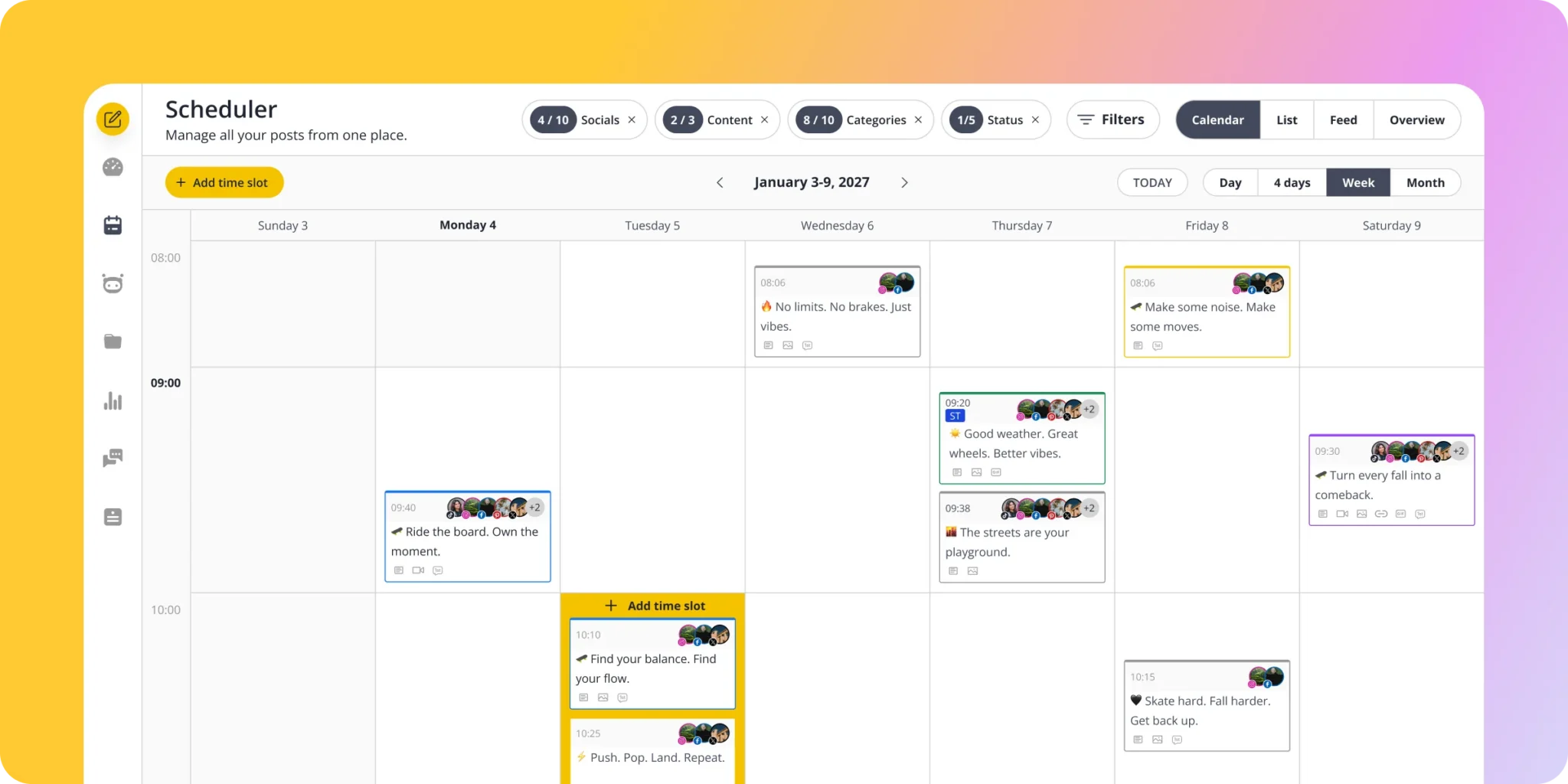
Consider a Nairobi property agency with an Instagram account that alternates between several nearly identical listing posters and long periods of silence. A category structure makes the missing subjects visible. You can deliberately reserve space for the questions a buyer asks before booking a viewing, instead of filling every available slot with another price card.
| Suggested category | What belongs there | How we would handle it |
|---|---|---|
| Buyer questions | Deposit preparation, viewing checklists, questions about recurring costs | Review for accuracy before reusing |
| Neighbourhood context | Location comparisons, access routes and nearby amenities | Update whenever the underlying facts change |
| Property walkthroughs | Approved photos, tours and specific unit details | Publish only while the unit information remains current |
| Evidence and updates | Verified progress, documented client stories and team explanations | Confirm source, permission and date |
| Viewing invitations | Open days, launch events and availability notices | Use a fixed date and an expiry rule |
These are our suggested categories, not a claim that SocialBee supplies a ready-made Kenyan property strategy. Their value comes from matching content to the buying process. An audience that repeatedly asks about service charges needs a useful explanation of total ownership costs; another generic motivation post will not answer that objection.
Evergreen recycling needs an expiry policy
SocialBee supports re-queueing suitable content and expiring posts by date or number of shares. That can reduce repetitive scheduling, but property marketing requires care. A general viewing checklist may be reusable. A specific availability statement, deposit offer or event invitation may become inaccurate within days.
We would keep market-sensitive claims out of indefinite queues. Assign someone to review prices and availability before publication, and pause the relevant content when a unit is reserved. An expiry setting stops future scheduling of that content; it should not be treated as a promise to erase posts already published on a social network.
The practical advantage is control over your content mix. The practical cost is setup and maintenance. A business unwilling to organise its material or retire outdated posts will not get the full value from category-based automation.
AI Copilot: a useful draft, with strategy still to verify
SocialBee’s AI Copilot is designed to recommend platforms, content categories and posting schedules, and generate editable posts. Its content tools also support caption variations and AI-generated visuals. This makes the product more than a place to store a finished caption.
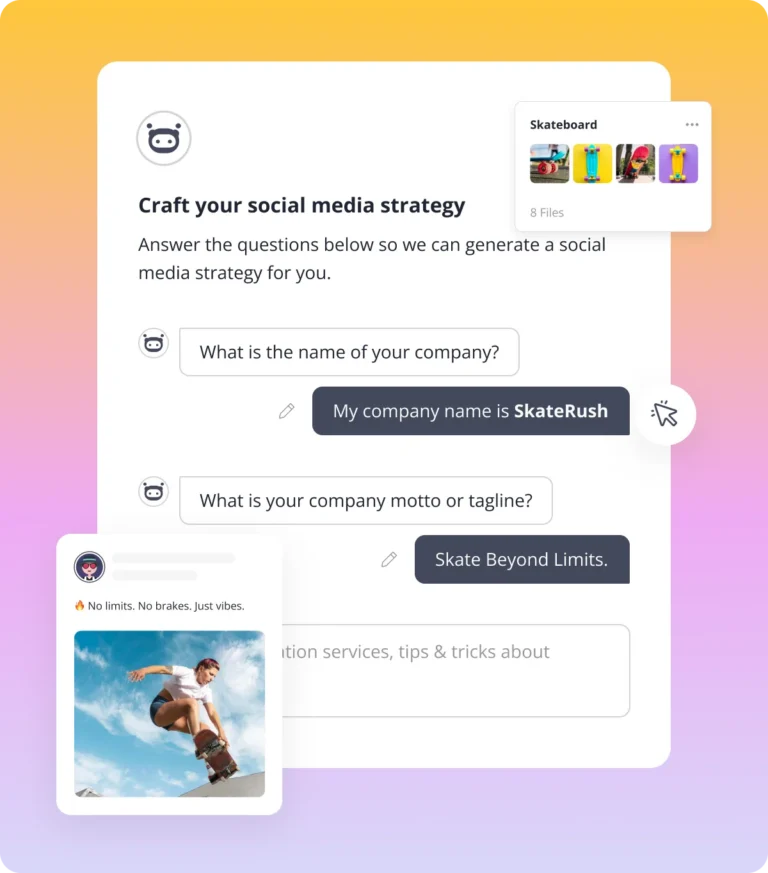
Our view is that Copilot is most useful as a planning assistant. It can give a business a starting structure and help turn a sound idea into several drafts. That is different from establishing, through customer research, that the proposed audience, message and offer will produce sales.
What to include in a useful business brief
Where the questionnaire and available prompts permit, supply specific context. If a detail cannot be entered, use it as your manual review checklist. For a Kenyan developer, a useful brief should identify the project, verified price range, intended buyer, delivery status, purchase process, recurring objections and available evidence.
Example brief: We market a residential project in Kiambu to working households comparing homes for personal use. Buyers ask about commuting, water supply, service charges and the payment schedule. Use only the approved fact sheet. Do not invent financing approvals, completion dates, occupancy levels or investment returns. Draft educational posts that answer one question and direct interested readers to a viewing enquiry.
This example deliberately includes boundaries. A vague instruction such as ‘make luxury property posts that sell’ gives the system very little to work with. Better input should make the draft more relevant, but the final caption still needs someone who understands the property and the audience.
Can it replace Canva or a video editor?
SocialBee offers visual integrations including Canva, Unsplash and GIPHY, along with image editing and AI assistance. That can simplify moving visuals into your publishing workflow. It does not mean a SocialBee subscription includes every paid feature of a separate design service.
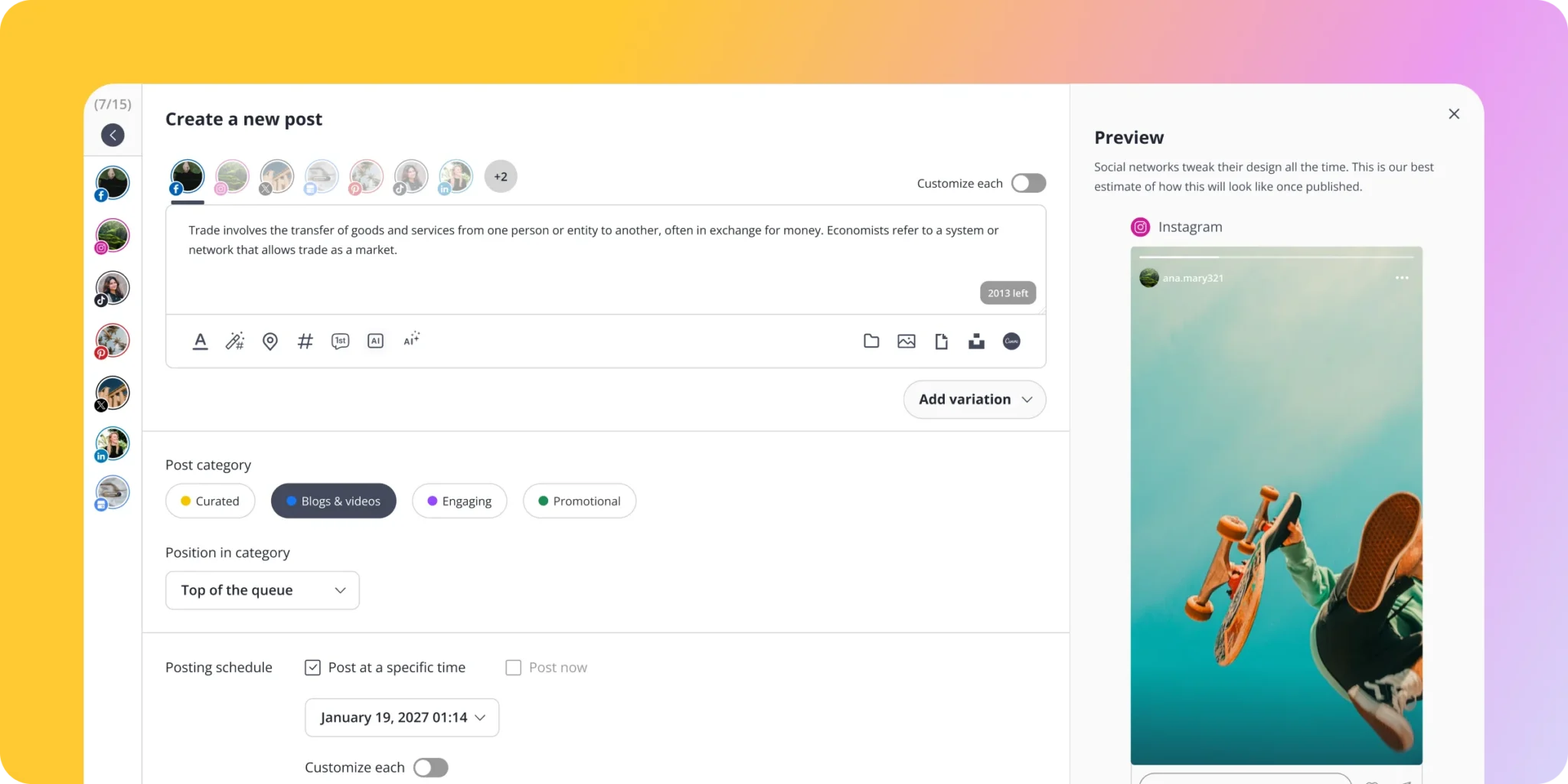
We would use a dedicated editor for footage selection, pacing, voice-over timing, accurate captions and the opening seconds of a property Reel. SocialBee belongs later in that process, when the asset is ready for review and distribution. A scheduler cannot rescue a tour that omits the room layout or a hook that never explains why the property is relevant.
For listings, use approved photographs, footage and properly identified renders of the actual development. AI-generated interiors should never quietly stand in for evidence of a unit’s condition or finish. The review images on this page show SocialBee itself rather than invented property projects.
Supported networks: where automatic publishing has limits
The official account matrix covers Facebook, Instagram, LinkedIn, X, Pinterest, Google Business Profile, TikTok, YouTube, Threads and Bluesky. The important buying question is whether your particular profile and content format can publish automatically, and which features need a manual step.
| Destination or requirement | What to check before relying on it |
|---|---|
| Facebook Pages | Supported content can publish directly; check the media requirements |
| Facebook personal profiles and Groups | Plan for reminder publishing and a person to complete the post |
| Instagram professional accounts | Test the exact account type and format; documentation varies by feature |
| Instagram personal accounts | Reminder publishing rather than unattended automatic posting |
| TikTok | Direct publishing is available for supported posts; native music and unsupported formats may need manual completion |
| Google Business Profile | Useful for supported updates; not a replacement for full listing administration |
| WhatsApp and similar Universal profiles | A scheduled reminder is not an automated broadcast or messaging integration |
We found an inconsistency worth highlighting: the general account matrix lists direct publishing for Instagram Creator profiles, while the dedicated Reels guide describes Creator Reels as reminder-based. Rather than promise that every Creator-account Reel will auto-publish, we recommend testing that exact workflow and asking support to confirm it before purchase.
The Instagram Reels guide also explains that stickers, native filters and trending sounds can require reminder publishing. For anyone building property videos around a particular sound, this affects how much of the process can actually run unattended.
Trending audio still changes the workflow
SocialBee’s TikTok documentation says third-party tools cannot automatically attach trending or licensed audio from TikTok’s in-app library. Audio already embedded in an uploaded video is a different case. Use only audio you have the necessary rights to publish.
For an evergreen walkthrough with an approved voice-over, automatic distribution may be convenient. For a Reel that depends on a native music selection or interactive feature, the more realistic workflow may be preparation in SocialBee followed by a phone reminder and final publishing in the platform’s app. Assign that last step to a named person.
Its Universal Posting feature follows the same distinction: it helps plan posts for otherwise unsupported destinations by sending reminders. It is not evidence of a full WhatsApp marketing automation system.
Check media dimensions, captions, thumbnails and the publishing method for each selected destination. One caption and one video file can behave differently across networks. Keep the source files and review the published post, not only the scheduler preview.
Agency workspaces, approvals and client accountability
SocialBee’s collaboration features include workspaces, roles, post approvals and feedback. The workspace guide explains how profile, user and workspace allowances differ between plans.
For an agency, separate workspaces can reduce the chance of mixing client content and make handovers easier. The important test is not simply whether a workspace exists. It is whether the right person can enter it, review the correct draft and approve the intended version without gaining unnecessary access to other clients.
Count people and client workspaces separately
For illustration, five clients with five profiles each use 25 profile connections. That fits Pro’s headline profile allowance, but also uses its five included workspaces if each client needs one. You should not assume there is a sixth workspace available for your own agency brand. Nor should you assume that every external reviewer sits outside the user allowance.
Before committing, map who creates, checks and approves each post. Ask whether a client needs an account, what access they receive, how seats are counted and what happens when an approved post changes. Test those details with the plan you intend to buy, including any add-ons, rather than relying on a generic ‘team collaboration’ label.
- Writer or content manager: prepares the caption and selects approved media.
- Property or product owner: verifies price, availability, terms and other factual claims.
- Publishing lead: confirms the final version, destination and scheduled time.
- Enquiry owner: checks replies and records the next sales action.
Approval should mean more than ‘the design looks good’. A well-written post with an obsolete phone number or inaccurate completion statement is still a publishing error. Keep the approved source of property facts accessible to the people reviewing the queue.
Analytics and engagement: useful data with clear boundaries
SocialBee’s analytics product page describes audience, post and engagement reporting. Its dashboard documentation gives the more useful operational detail: available metrics and historical data vary, and analytics are handled by individual profile.
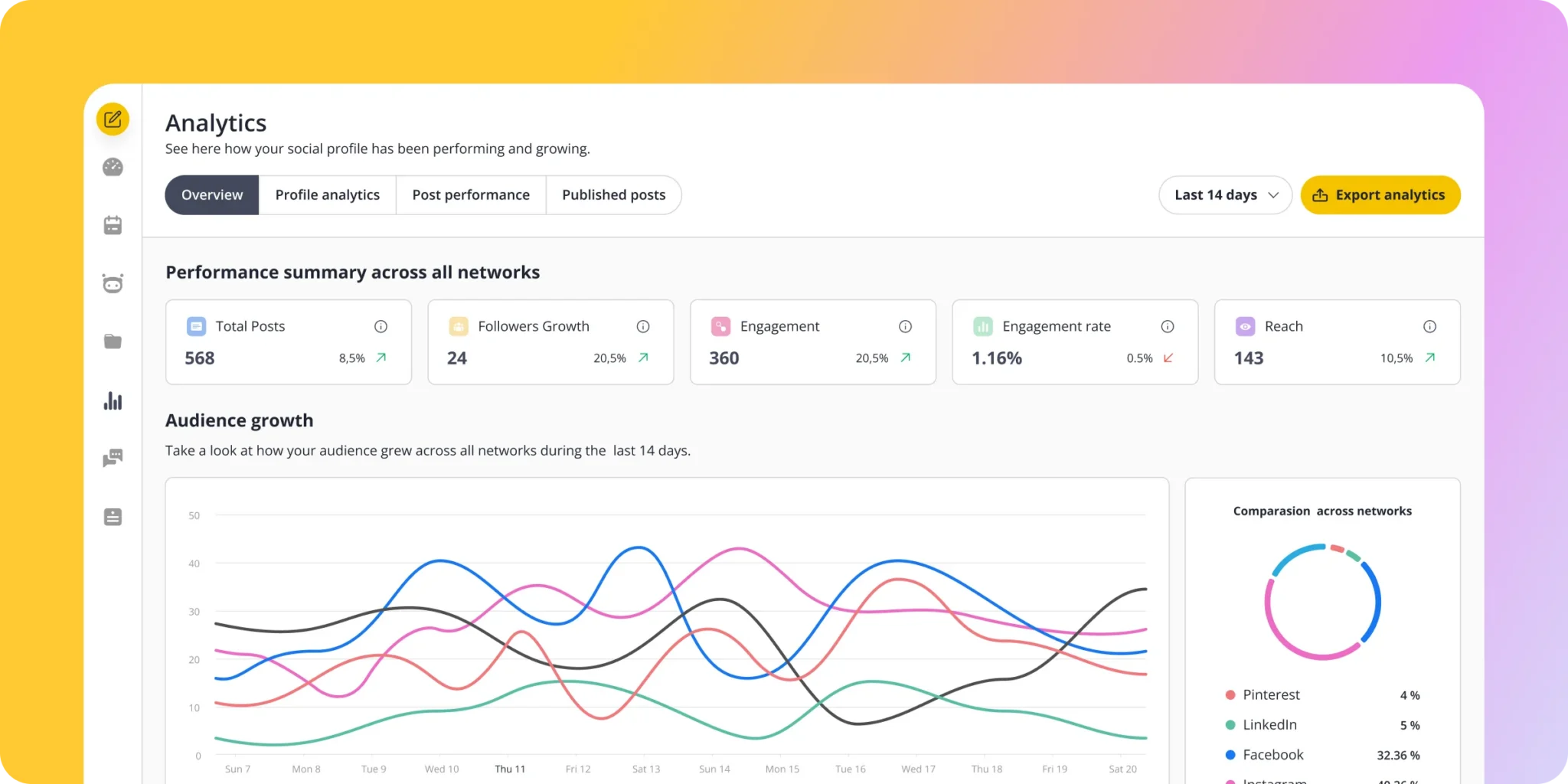
A property team can use those reports to identify which topics attract attention and which formats deserve another attempt. However, views and engagement are only part of the commercial picture. A video that produces several serious viewing requests can be more valuable than a popular clip watched mainly by people outside your target market.
Reporting limits agencies should test
The export help page says reports are exported one profile at a time and that YouTube analytics export is currently unavailable. It also limits the organic-versus-paid comparison to Facebook. Do not promise a single combined cross-network client report until you have checked the output you can actually produce.
SocialBee generally lists three months of analytics history on Bootstrap and up to two years on the higher standard plans. The dashboard guide identifies exceptions, including Pinterest history up to 90 days and Google Business Profile history up to 18 months. A plan-level headline should not be read as two years of identical metrics from every platform.
The inbox is not a complete sales CRM
The Engage documentation supports Facebook and Instagram messages, with comments or mentions available for several other networks. It does not provide every interaction type on every connected platform. The help page also states that assigning individual conversations to specific users and automatic replies are not currently available.
For a small team, seeing supported conversations in one place may reduce missed replies. For a larger sales operation, conversation ownership, lead status and next-action reminders may require a separate CRM or a simpler lead register. SocialBee should not be purchased on the assumption that it manages the complete journey from first comment to signed sale.
Set an internal response routine and check the original apps for anything the integration does not show. Platform connection permissions and messaging rules still apply. The presence of an inbox does not remove the need to decide who is responsible when a buyer asks to view a property.
How we would use SocialBee for Kenyan property marketing
The following is a proposed workflow, not a Social Scale Kenya case study or a promised outcome. It shows how a property business could judge the product against a real commercial process.
1. Start with one development and one next step
Choose one current development or a clearly defined listing portfolio. Assemble an approved fact sheet with location, unit options, verified price information, payment terms, recurring costs, current status, approved visuals and the enquiry contact. Decide whether the next step is a viewing request, a brochure enquiry or a call. A post that sends readers to several competing actions makes follow-up harder to interpret.
2. Build content around the buyer’s questions
Record what the sales team is actually being asked. One buyer may need to understand commuting and household costs; another may want to compare unit layouts or clarify the purchase process. Make those questions the starting point for categories, scripts and captions. Use Copilot for drafts, then check each answer against the source material.
3. Batch assets and verify every platform version
Produce the walkthrough, photographs or explanatory graphic, then adapt the caption to its destination. A LinkedIn post may explain the decision in more depth, while an Instagram caption may point viewers towards one clearly worded action. Use the calendar to spot repeated topics and missing answers, not simply to make every square look full.
4. Keep time-sensitive content out of indefinite queues
Give viewing events and dated offers a defined endpoint. Review available units before the next batch is approved. If a launch is delayed, pause the affected content and update the source document. The scheduler should reflect the sales operation’s current information.
5. Connect publishing to enquiry handling
Use consistent campaign labels and tracking links where suitable. Record the source, property of interest, qualification details, next action and eventual outcome in your lead register. If a prospect moves from Instagram to WhatsApp, preserve that source information through the handover. Do not count the same person as several new leads simply because the conversation used more than one channel.
| Question | A useful measure | Why it matters |
|---|---|---|
| Did the publishing process improve? | Preparation time, missed posts and factual corrections | Tests whether the subscription solves the operational problem |
| Did the content attract relevant interest? | Useful questions and enquiries linked to the topic | Separates audience activity from empty reach |
| Did enquiries move forward? | Qualified enquiries, booked viewings and attended viewings | Shows where sales follow-up succeeds or stalls |
| Did the work make commercial sense? | Actual costs and attributable outcomes where records permit | Prevents optimistic assumptions about return |
For the broader process, read our guide to real estate digital marketing services in Kenya. Publishing software works best when the message, evidence, enquiry path and follow-up process fit together.
Need a content process your team can actually maintain?
Social Scale Kenya can help you assess your audience, organise property content and connect campaigns to an enquiry process. Start by telling us what you sell, where marketing gets stuck and who currently handles incoming leads.
SocialBee pros, cons and the alternatives worth comparing
| Where it makes sense | Where to be cautious |
|---|---|
| Categories give recurring content a deliberate place in the schedule | The structure still needs an owner and accurate source material |
| Reusable posts can reduce repeated scheduling work | Old prices, offers and availability can become misleading |
| AI can help produce and adapt drafts | Generated strategy is not evidence of demand or sales effectiveness |
| Workspaces and approvals support a repeatable review process | Users, profiles and workspaces have separate limits |
| Supported engagement and reports bring useful tasks together | Inbox coverage and reporting are not universal across networks |
| The trial offers a practical way to assess fit | Pro trial features may not be included in the plan you later choose |
SocialBee versus free native scheduling
Meta Business Suite is a free option for businesses mainly working on Facebook and Instagram. If your publishing needs are simple and your team can keep the process organised, it is a sensible baseline. SocialBee becomes easier to justify when recurring categories, reusable content and a wider network mix remove work that the native setup leaves you doing manually.
SocialBee versus Buffer
Buffer offers a free plan with up to three channels and ten queued posts per channel. Its paid pricing is based on connected channels. Compare it when a small account list and a straightforward queue are the main requirements. SocialBee is particularly worth examining if your planned workflow depends on a library of categories and recurring evergreen content. Test the same tasks in both rather than assuming either interface will suit you.
SocialBee versus Later and Hootsuite
Later offers scheduling, visual planning and wider social workflow tools. It belongs on a shortlist when the way a team plans visual content is central to its choice. Compare current allowances and the exact approval and inbox workflow, rather than relying on older descriptions of Later as only an Instagram planner.
Hootsuite offers a broader suite spanning publishing, customer care and listening. If those functions are purchase requirements, assess the relevant package and its total cost. For a small team that mainly needs organised publishing, paying for a wider suite may not be the best use of its budget. This is a workflow comparison, not a claim of hands-on performance testing between the products.
SocialBee is also different from an SEO tool. Our SE Ranking review covers a separate set of tasks around search visibility. Neither subscription should be added simply because another marketing tool is already in place.
Use the 14-day trial to answer these buying questions
Do not spend the whole trial browsing features. Run a small version of your normal work, record the friction and decide which parts you would actually keep. The objective is to establish whether the product improves a repeatable process enough to justify its ongoing cost.
- Days 1 and 2: connect the exact accounts you intend to manage. Confirm account types, access rights and time zones. For a Kenyan audience, check that scheduled times are interpreted as intended in East Africa Time.
- Days 3 and 4: build a few useful categories, enter approved content and test one evergreen item alongside a dated post. Confirm what happens when content expires.
- Days 5 to 7: publish representative formats. Include an image post, a carousel if relevant, a ready-edited video and a reminder-based post. Inspect the real published output.
- Days 8 to 10: test the review process with the people who will use it. Check what each person can see and who can approve. If inbox handling matters, verify actual coverage and missed-message risks.
- Days 11 and 12: examine the analytics you need and export a sample report if the intended plan allows it. Check how much work remains outside the tool.
- Days 13 and 14: compare preparation time, error rate and manual steps with your current process. Check the chosen plan’s limits and final price before paying.
Use a simple decision rule: keep SocialBee if it reliably removes a recurring operational problem at an acceptable cost. Wait if it only creates the feeling that your marketing is more organised. A visually complete calendar is not enough if the content remains irrelevant or nobody follows up the enquiries.
Our buying recommendation: Start with a real workflow in the trial. Choose the smallest plan that supports the required accounts, people, approvals and reporting. Consider annual billing only after you have established that the process is worth keeping.
Frequently asked questions about choosing SocialBee
Is SocialBee worth it for a small business?
It can be if publishing across your accounts is a recurring drain on time and the category system fits your content. If you only need occasional Facebook and Instagram posts, compare the free native option first. Your saved work and improved reliability should justify the cost.
Is SocialBee free?
SocialBee advertises a 14-day trial without a credit card. Its continuing standard service is paid. Check the current pricing page for the plan and billing period you intend to use.
Can SocialBee create a complete social media strategy?
Copilot can generate a starting plan with categories, suggested platforms, a schedule and editable content. Treat that as a draft. Customer evidence, commercial priorities, factual checks and sales follow-up still require judgement.
Does SocialBee automatically publish every post?
No. Automatic publishing depends on the network, account type and content format. Some posts use mobile reminders and require you to complete publication in the native app. Test the particular formats your business needs.
Can I add trending Instagram or TikTok audio?
Native music libraries and effects may require final publishing inside Instagram or TikTok. A video with audio already embedded is a separate case. Check the platform-specific requirements and your rights to use the audio.
Can a Kenyan real estate agency use SocialBee?
It is a reasonable tool to evaluate for a Kenyan agency’s publishing process. Check account access, time zones, payment arrangements, profile limits, approval needs and the way enquiries move to your sales team before subscribing.
Will SocialBee bring property enquiries automatically?
A scheduler does not establish buyer demand or guarantee leads. Enquiries still depend on the audience, offer, property information, creative quality, distribution and response process. Measure qualified interest and sales progress alongside social activity.
Can SocialBee replace a CRM?
We would not use it as the sole sales record. Its engagement tools help with supported social conversations, while a CRM or lead register records qualification, ownership, follow-up and deal progress.
Does the review contain affiliate links?
Yes. The SocialBee buttons marked as affiliate links use our referral link. Social Scale Kenya may earn a commission if you subscribe through them. Documentation links and image source credits remain direct references.
Sources and editorial notes
Product information was checked on 23 October 2026. Features, prices and platform permissions can change. Our recommendations, examples and trial framework are Social Scale Kenya’s editorial assessment; they are not vendor guarantees or measured client outcomes.
- SocialBee pricing and plan comparison
- SocialBee help: choosing a pricing plan
- SocialBee AI Copilot and feature overview
- Supported account matrix and Instagram Reels publishing guide
- TikTok publishing guide and Universal Posting
- Analytics dashboard, report export and Engage coverage
- Meta Business Suite, Buffer pricing, Later scheduling and Hootsuite platform
SocialBee product images and trademarks belong to their respective owners. Screenshots are included to explain the reviewed product. Demonstration figures in those images are not Social Scale Kenya results.

